

Automated Route Creation
Build daily routes without piecing together every stop by hand.
PerGo turns selected trips, vehicle availability, driver schedules, and service constraints into route plans dispatchers can review, adjust, and publish from the same workflow they already use.
What It Does
Route creation connects trip selection, vehicle readiness, optimization, and publish controls.
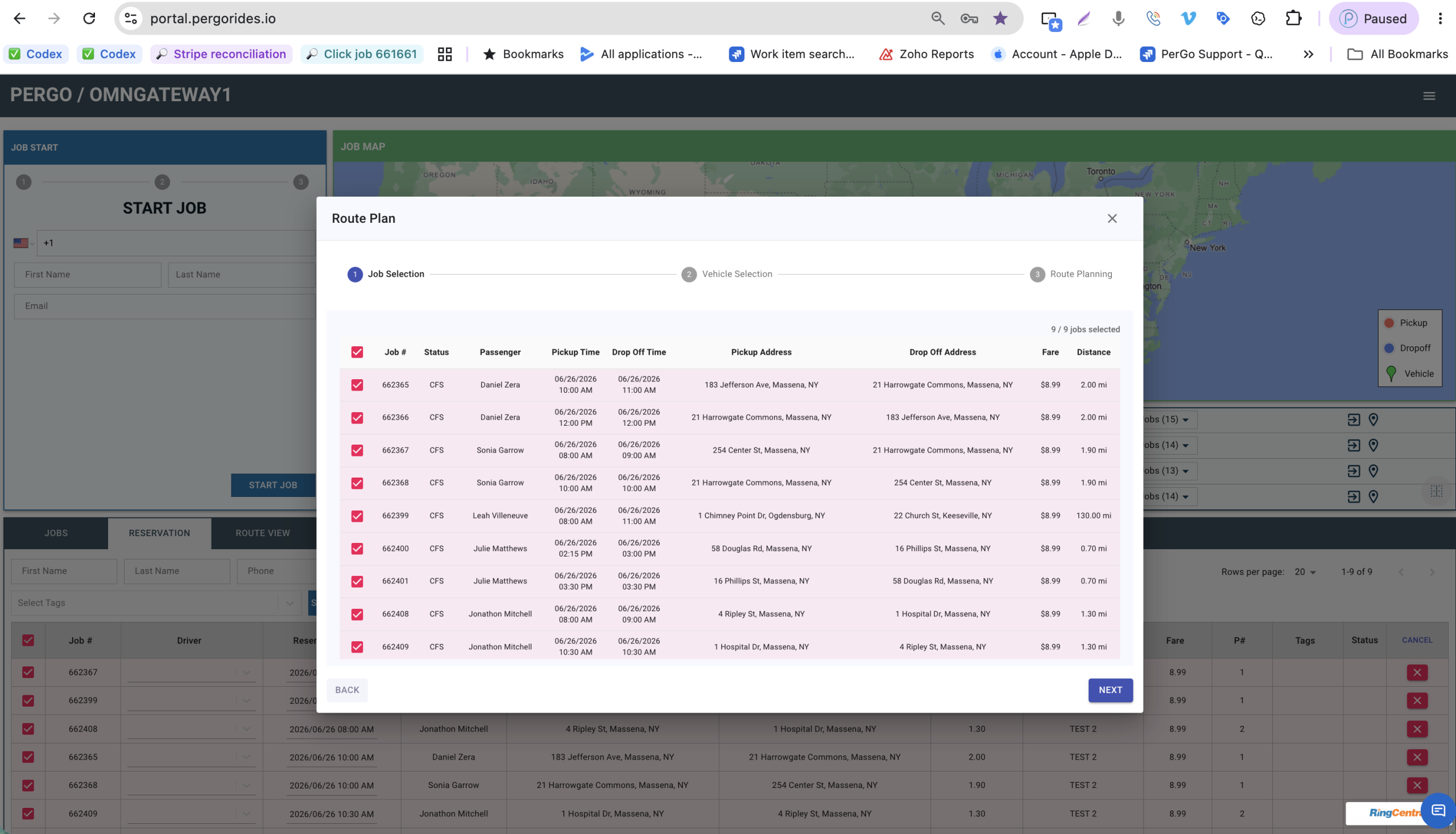
The existing Route Plan workflow starts inside the PerGo portal with selected trips, pickup and dropoff details, fare, distance, and a guided path into vehicle selection and route planning.
Select the route jobs
Dispatchers can review selected jobs in one modal before route planning begins, including passenger, pickup time, dropoff time, and status.
Validate trip details
Pickup addresses, dropoff addresses, fare, and distance stay visible so dispatchers can catch unusual trips before moving forward.
Move into route planning
The stepper keeps dispatchers oriented as they move from job selection to vehicle selection and then into route planning.
Dispatcher Control
Automation proposes the route plan. Dispatchers stay in control before anything is published.
Review every generated route
- See route score, stop count, mileage, duration, and risk level.
- Open selected stop details before approving the plan.
- Move trips, split routes, or lock stops when dispatch judgment matters.
Publish only after final checks
- Confirm no unassigned trips, missing schedules, or blocking late pickups.
- Preview driver routes before sending them to the field.
- Publish to the driver app and update the dispatch board from one place.
Existing Platform Screen
Built around the Route Plan workflow operators already use.
The page now uses the actual PerGo portal Route Plan screen as its visual anchor, keeping the landing page tied to the feature that exists in the platform today.
- Job Selection, Vehicle Selection, and Route Planning steps.
- Passenger, pickup time, dropoff time, and status in one table.
- Pickup address, dropoff address, fare, and distance visible before continuing.
- Clear actions for dispatcher control.
Give dispatchers a faster way to turn daily trips into driver-ready routes.
See how PerGo automated route creation can reduce manual planning work while keeping dispatchers in control of the final route plan.